
What is Back Button Hijacking in Google? The New Google Spam Update Of 2026: Problems, Deadline, and Solution
📅 Publish Date
April 14, 2026
⏳ Last Date
June 15, 2026
🚨 What Is the Issue?
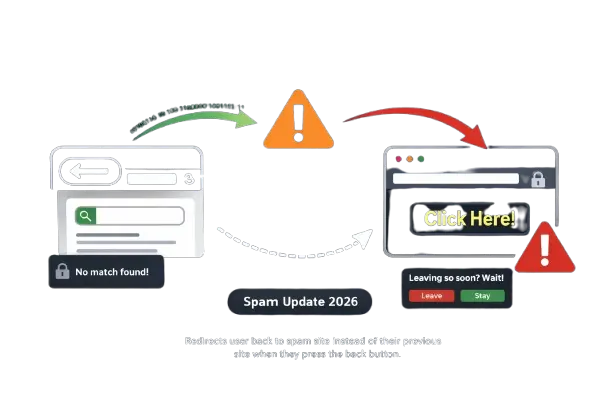
Are you confused about what is back button hijacking in Google? It is a manipulative technique used by which users cannot go back to the search results after visiting your website via Google.
The search engine has developed a fresh spam policy to counteract such behavior, and learning what is back button hijacking in Google becomes important for all website owners and marketers.
👉 Here’s what occurs:
You click your website from Google.
You hit the back button.
❌ However, instead of going back to the search results, the user ends up with:
Being redirected to a different page.
Seeing advertisements/popup notifications.
Or being trapped in your website.
👉 It makes for a terrible browsing experience and is considered spam. That is what exactly meant by what is back button hijacking in Google.
⚠️ Reason for Taking This Seriously
Knowing what is back button hijacking in Google will help you understand its seriousness:
Affects normal browser activity
Manages user navigation process
Causes bounce rate frustration
Is considered a misleading practice by Google
👉 Starting June 15, 2026, your website may suffer from:
❌ Drop in rankings
❌ Manual penalty
❌ Removal from the index (in extreme cases)
🔍 Root Causes (Highly Important)
To completely understand what is back button hijacking in Google, there are some factors to consider:
1. JavaScript manipulation
Incorrect use of history.pushState()
Disabling users to leave the website
2. Third-party advertising codes
Affordable advertisement providers forcing redirects
Pop-ups when clicking on the back button.
3. Malicious plug-ins/themes
In particular for WordPress websites
Redirect codes hidden in the system.
4. Cloaking or redirect tricks
Showing a different webpage on exit
🛠️ How to Test Your Site for Google Back Button Hijack?
Are you uncertain about what is back button hijack in Google and if your website suffers from it? Try this:
Open your website using Google
Go to any page of it
Hit the back button
👉 In case:
You get redirected to Google ✅ → You are safe
You are getting redirected or ads appear ❌ → You have an issue
✅ Fixes (Solve Immediately)
Having learned about what is back button hijack in Google, it’s time to address the problem.
✔ Remove Malicious Code
Inspect your scripts
Get rid of pushState misuse
✔ Audit Ad Networks
Eliminate low-quality partners
Work with reliable ones only
✔ Check Plugins and Themes
Delete nulled plugins
Always update all plugins
✔ Disallow Back-Triggered Popups
Don’t use tricks that change the navigation process
✔ Use Security Tools
Scan your website for malicious files
Control redirects
💡 Pro Tips for SEO (Extra Benefit)
Knowing what is back button hijack in Google allows you to avoid penalizations and make a good SEO start:
Pay attention to the user first
Stay away from “trick-based” engagement
Rely on pure user experience
👉 Google now encourages:
Real user engagement instead of artificial one
Conclusion:
In summary, as evident above, you now know what is back button hijacking in Google, as well as the reason behind its significance in relation to the spam update that has just occurred. Not only will the activity interfere with the browsing experience of the users, but it will show signs of manipulating search engines, and thus, may result in dire consequences to your website.
Avoiding the activity in question becomes an absolute necessity once you take into account the changes Google has implemented through the spam update in 2026.
Ultimately, knowing what is back button hijacking in Google will help ensure that you maintain a successful SEO strategy.
Why Should You Trust This Article?
This article is written by Krishnapriya who is is a freelance digital marketer in Palakkad who specializes in SEO, Local SEO, content marketing, Google Search Console optimization and website growth strategies. She shares valuable insights on Google updates, SEO trends and digital marketing best practices to help businesses improve their online visibility. This article is based on the latest SEO best practices, Google Search updates, and website optimization techniques. The content is regularly reviewed and updated to ensure accuracy and relevance to website owners, blog writers and digital marketers.
What Is Back Button Hijacking Real-World Example
For example, a user types “best digital marketer in Palakkad” into Google and clicks on a website from the results.
The user reads the content, and then clicks the back button of the browser to go back to Google. The website redirects the user to another page, displays an advertisement or a popup, instead of showing the search results page again. This is known as back button hijacking and is considered a bad user experience.
Google considers these practices to be deceptive, as they interfere with the normal navigation of the browser and can be a source of frustration for the user.
Google's Official Guidance
Google wants to make sure that website owners are doing their best to make the web a safe and user-friendly place to visit. Try to control browser navigation, redirect users unexpectedly, or prevent users from leaving a page. This can violate Google’s spam policies and negatively affect your search performance.
Website owners should regularly review plugins, scripts, ads and third-party tools to ensure they do not affect the regular functioning of browsers.
What is back button hijacking in Google?
Why is Google targeting back button hijacking?
Can WordPress websites be affected?
How can I check whether my website has this issue?
Can back button hijacking affect SEO rankings?
Best Practices to Remain Compliant with Google’s Spam Policies
- Put the user experience first, not fake engagement tricks.
- Avoid allowing it to let it lead you in the wrong direction or force you along.
- Only use trusted advertising networks.
Regularly update plugins, themes and scripts. - Scan your website for malware and malicious code regularly.
- Monitor site performance, security tools and more with Google Search Console.
- Follow Google’s Search Essentials guidelines
Last Updated: June 2026
Category: SEO Updates
#Google Spam Update, #what is Back Button Hijacking, #Google SEO, #Website Security, #Search Engine Optimization, #Google Search Console

Services
Contact
kayiliad(po) shornur-2 Palakkad -679122
9207657292
krishnapriyathalappil2002@gamil.com
Copyright 2025, Krishnapriya. All Rights Reserved.